
Research a contributor
The Contributors directory and an individual contributor profile can cover different records. In particular, person and source-listed contributor profiles currently exclude federal contribution records, even when federal activity is available elsewhere in BackerBase.
Find a contributor
Section titled “Find a contributor”- Open Contributors (
/donors) and search for a name. Use the contributor-type controls to narrow the results when needed. - Open Filters to set dates, reported location, or record-amount limits, then select Apply scope.
- Compare the result’s name, recipient pattern, and available identity context before opening its profile. Universal search (
/search) is another way to find a person or source-listed contributor. - Read the profile’s identity notice and select an Election cycle, or Lifetime, before interpreting its figures.
Minimum record amount and Maximum record amount apply to individual contribution records, not a contributor’s combined giving. Reported city and state are filing observations, not proof of current residence.
Recheck the profile’s scope after opening it. Directory filters do not establish the profile’s period or source coverage. Lifetime means the available history for that profile, not every contribution the subject has ever made.
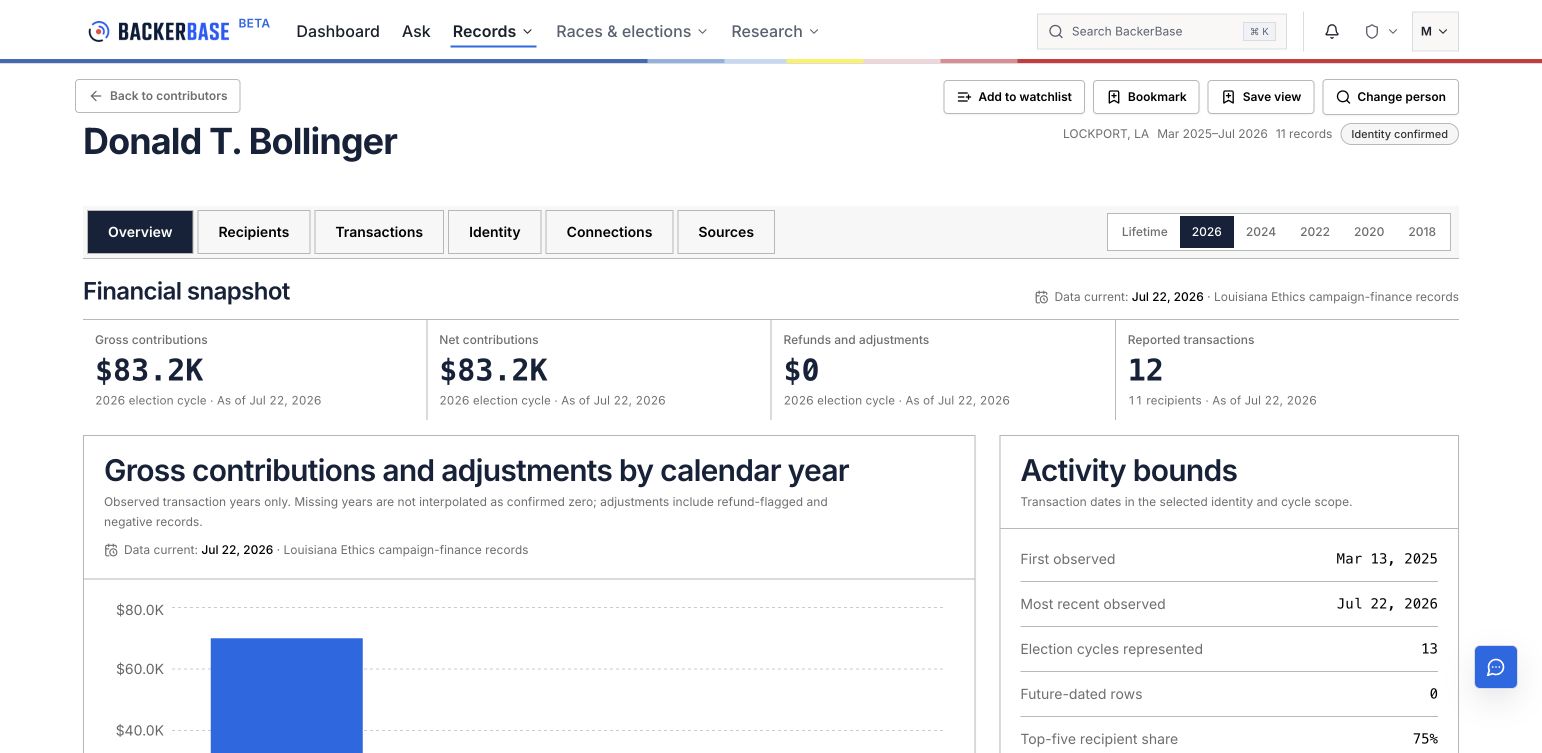
Select an image to view it at full size. Screens captured September 7, 2026; example records and totals can change.
Check identity first
Section titled “Check identity first”An accepted person profile includes only contributor records confirmed as that person. A source-listed contributor profile represents one name record that has not necessarily been confirmed as a unique person.
Open Identity to review available name records, filing locations, and identity evidence. Similar names, shared recipients, an employer entry, or an address alone are not enough to combine records into one person.
Employer, occupation, business, nonprofit, and property relationships may be unavailable. A blank section does not establish that no such relationship exists.
Read giving and recipients
Section titled “Read giving and recipients”In Overview, compare gross contributions, refunds and adjustments, and net contributions within the selected scope. Gross and net answer different questions; use the same measure when comparing contributors.
Open Recipients for one summary row per recipient. The Transactions section shows individual dated contributions and adjustments. A recipient summary is not an additional contribution to add to those transactions.
Party composition describes the recipients of reported contributions. It does not establish the contributor’s political affiliation or intent. Missing years in a trend are not confirmed years of zero giving.
Inspect a contribution
Section titled “Inspect a contribution”- Open Transactions.
- Search the records by recipient, contributor name, description, report, or source. Use the available sorting and page controls to inspect matching records.
- Select Inspect on a record to review its transaction date, amount, event type, source-listed identity, description, and provenance.
- Open the available filing link and match the recipient, date, amount, and report to the source.
- Preserve refund or negative-adjustment labels when recording the finding.
Export current page · CSV exports only the current table page. It is not an export of the entire giving history or all matching results. A record search narrows the transaction table; it does not redefine the profile’s overview totals.
Walkthrough: filter a record and inspect its source
Section titled “Walkthrough: filter a record and inspect its source”This 20-second, silent walkthrough advances through four captured screens. Use the playback controls to pause or view it full screen. English captions describe each step; the same steps are written below.
- Select 2026 on the contributor profile and check the source and as-of date.
- Open Transactions to see individual records within that cycle.
- Enter Stephanie Hilferty in Search these contribution records. The table narrows to the matching recipient; overview totals keep their original scope.
- Select Inspect. Compare the transaction and source-listed identity, then read Provenance for the source system and report ID.
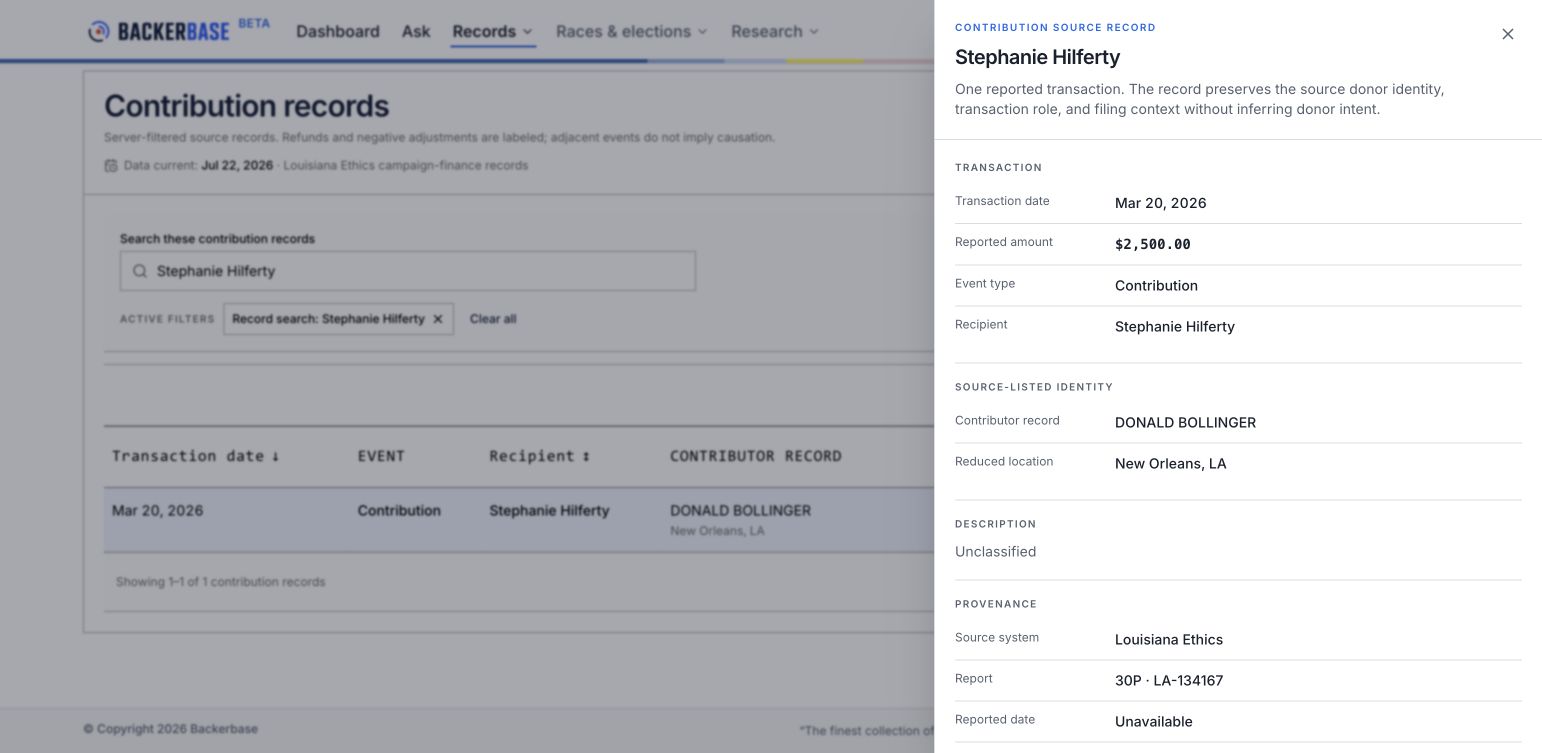
This example has a report ID but no direct filing link. When a filing link is available, open it and verify the record against the original report. An unavailable reported date is not the transaction date.
Check sources and connections
Section titled “Check sources and connections”Open Sources to compare transaction coverage with BackerBase update dates. An update date does not mean that the originating source has complete reporting through that day.
The Connections view begins with a selected contributor record. Even on a person profile with several confirmed name records, the network may cover only that starting record. Shared recipients do not establish association or coordination between contributors.
If expected giving is missing
Section titled “If expected giving is missing”- Clear the transaction search or broaden the election cycle.
- Try a filing-name variation in Search all records.
- Check whether the expected contribution is federal; federal records are outside the person and source-listed contributor profiles described here.
- Review Data status and methodology (
/data-status) and any partial-coverage notice. - Use Feedback to report a specific missing record, including a public source link and identifier when available.
Do not treat a failed request, empty result, or missing source link as proof of no contributions.